# Test Harness

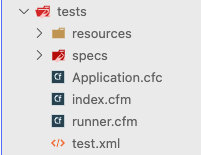
Every ColdBox application template comes with a nice test harness inside of a `tests` folder.

<figure><img src="/files/r5Q3wYsvgOFlUaXewsyW" alt=""><figcaption><p>Test Harness</p></figcaption></figure>

<table><thead><tr><th width="200">File/Folder</th><th>Description</th></tr></thead><tbody><tr><td><code>Application.cfc</code></td><td>A unique application file for your test harness. It should mimic exactly the one in your root application folder</td></tr><tr><td><code>resources</code></td><td>Some basic testing resources or any of your own testing resources</td></tr><tr><td><code>runner.cfm</code></td><td>The HTML runner for your test bundles</td></tr><tr><td><code>specs</code></td><td>Where you will write your testing bundle specs for integration, unit, and module testing, try to use the convention of <code>{name}Spec.cfc or {name}Test.cfc</code></td></tr><tr><td><code>test.xml</code></td><td>A TestBox ANT runner</td></tr></tbody></table>

## Application.cfc

The `Application.cfc` for your tests is extremely important as it should mimic your applications real `Application.cfc`.

```cfscript
/**
 * Copyright 2005-2007 ColdBox Framework by Luis Majano and Ortus Solutions, Corp
 * www.ortussolutions.com
 * ---
 */
component {

	// APPLICATION CFC PROPERTIES
	this.name                 = "ColdBoxTestingSuite";
	this.sessionManagement    = true;
	this.setClientCookies     = true;
	this.sessionTimeout       = createTimespan( 0, 0, 15, 0 );
	this.applicationTimeout   = createTimespan( 0, 0, 15, 0 );
	this.whiteSpaceManagement = "smart";
	this.enableNullSupport    = shouldEnableFullNullSupport();

	/**
	 * --------------------------------------------------------------------------
	 * Location Mappings
	 * --------------------------------------------------------------------------
	 * - cbApp : Quick reference to root application
	 * - coldbox : Where ColdBox library is installed
	 * - testbox : Where TestBox is installed
	 */
	// Create testing mapping
	this.mappings[ "/tests" ]   = getDirectoryFromPath( getCurrentTemplatePath() );
	// The root application mapping
	rootPath                    = reReplaceNoCase( this.mappings[ "/tests" ], "tests(\\|/)", "" );
	this.mappings[ "/root" ]    = this.mappings[ "/cbapp" ] = rootPath;
	this.mappings[ "/coldbox" ] = rootPath & "coldbox";
	this.mappings[ "/testbox" ] = rootPath & "testbox";

	/**
	 * Fires on every test request. It builds a Virtual ColdBox application for you
	 *
	 * @targetPage The requested page
	 */
	public boolean function onRequestStart( targetPage ){
		// Set a high timeout for long running tests
		setting requestTimeout   ="9999";
		// New ColdBox Virtual Application Starter
		request.coldBoxVirtualApp= new coldbox.system.testing.VirtualApp( appMapping = "/root" );

		// If hitting the runner or specs, prep our virtual app
		if ( getBaseTemplatePath().replace( expandPath( "/tests" ), "" ).reFindNoCase( "(runner|specs)" ) ) {
			request.coldBoxVirtualApp.startup();
		}

		// Reload for fresh results
		if ( structKeyExists( url, "fwreinit" ) ) {
			if ( structKeyExists( server, "lucee" ) ) {
				pagePoolClear();
			}
			// ormReload();
			request.coldBoxVirtualApp.restart();
		}

		return true;
	}

	/**
	 * Fires when the testing requests end and the ColdBox application is shutdown
	 */
	public void function onRequestEnd( required targetPage ){
		request.coldBoxVirtualApp.shutdown();
	}

	private boolean function shouldEnableFullNullSupport(){
		var system = createObject( "java", "java.lang.System" );
		var value  = system.getEnv( "FULL_NULL" );
		return isNull( value ) ? false : !!value;
	}

}
```

Please note that we provide already a mapping to your root application via `/root` and a mapping to the tests themselves via `/tests` . We recommend you add any ORM specs or any other mappings here.

{% hint style="success" %}
**Tip:** Make sure all the same settings and configs from your root `Application.cfc` are replicated in your tests `Application.cfc`
{% endhint %}


---

# Agent Instructions: Querying This Documentation

If you need additional information that is not directly available in this page, you can query the documentation dynamically by asking a question.

Perform an HTTP GET request on the current page URL with the `ask` query parameter:

```
GET https://coldbox.ortusbooks.com/the-basics/testing-quick-start/test-harness.md?ask=<question>
```

The question should be specific, self-contained, and written in natural language.
The response will contain a direct answer to the question and relevant excerpts and sources from the documentation.

Use this mechanism when the answer is not explicitly present in the current page, you need clarification or additional context, or you want to retrieve related documentation sections.
