> For the complete documentation index, see [llms.txt](https://coldbox.ortusbooks.com/llms.txt). Markdown versions of documentation pages are available by appending `.md` to page URLs; this page is available as [Markdown](https://coldbox.ortusbooks.com/the-basics/testing-quick-start/browser-testing/named-routes.md).
# Named Routes
Build, visit and assert ColdBox named routes in browser tests with routeURL(), visitRoute() and assertRouteIs(), including module routes.
Hard-coded URLs make browser tests brittle: change a route pattern and every spec that visits it breaks. `BaseTestCase` builds URLs from your **named routes** instead, read from the router of the application your spec loads, so specs follow your router.
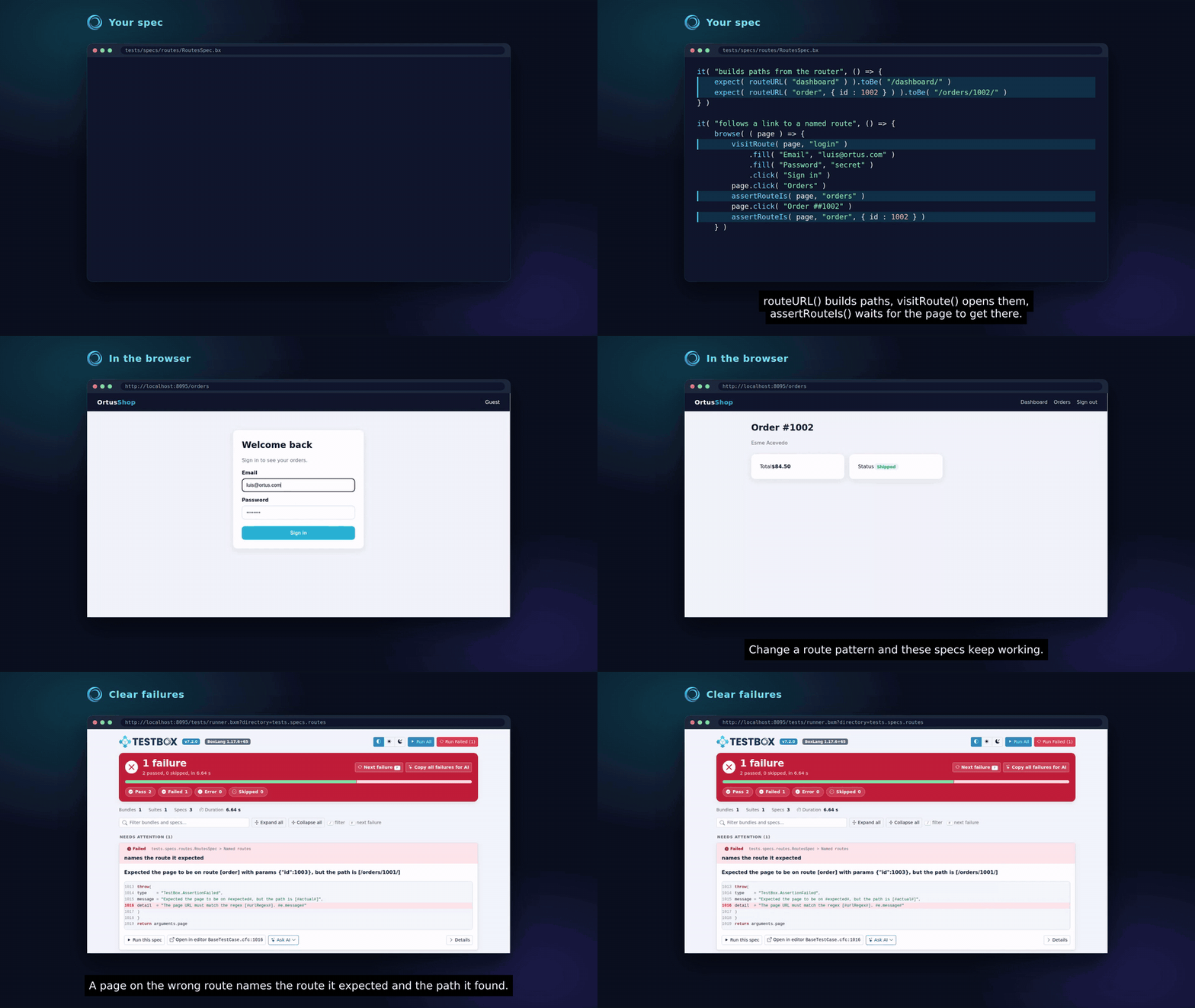
Named routes in a browser spec, and the message of a wrong route
```javascript
// config/Router.bx
route( "/users/:id" ).as( "users.show" ).to( "users.show" )
route( "/users" ).as( "users.index" ).to( "users.index" )
```
```javascript
it( "opens a user from the list", () => {
browse( ( page ) => {
visitRoute( page, "users.index" )
page.click( "Luis Majano" )
assertRouteIs( page, "users.show", { id : 1 } )
} )
} )
```
## routeURL()
`routeURL( name, [params] )` returns the **path** of a named route from the web root, without scheme and host. It includes the front controller when your app uses one (`/index.cfm`), the module entry point for module routes, and the route pattern with your params filled in. The `appMapping` of the spec is not part of it: it is a mapping, not a web path (see [Different URL Prefixes](#different-url-prefixes)).
```javascript
routeURL( "users.show", { id : 5 } ) // /users/5/
routeURL( "users.index" ) // /users/
routeURL( "posts@blog" ) // /blog/posts/
routeURL( "blog:posts" ) // /blog/posts/
```
It throws an `InvalidArgumentException` when the named route or its module does not exist, so a renamed route fails loudly. The helpers need a loaded application: in a test that does not load ColdBox (`loadColdbox=false`), they throw `BaseTestCase.NoColdBoxApp`. Because the result is a path, it resolves against the spec `baseURL` when you visit it, and you can use it anywhere you need a link, for example `page.visit( routeURL( "search" ) & "?q=coldbox" )`.
## visitRoute()
`visitRoute( page, name, [params] )` is a shortcut for `page.visit( routeURL( name, params ) )`. It returns the page, so you can keep chaining:
```javascript
visitRoute( page, "users.show", { id : 5 } )
.click( "Edit" )
.fill( "Name", "Luis" )
.click( "Save" )
```
## assertRouteIs()
`assertRouteIs( page, name, [params] )` asserts that the page is on a named route. It waits for the URL with bx-playwright's `waitForUrl()`, so it works right after a click or a form post that redirects.
| Call | Passes when |
| ------------------------------------------------- | ------------------------------------------------------------------------------------------------------------ |
| `assertRouteIs( page, "users.show" )` | The page path matches the route **pattern**: any value of its placeholders passes (`/users/5`, `/users/abc`) |
| `assertRouteIs( page, "users.show", { id : 5 } )` | The page path is the path of `routeURL( "users.show", { id : 5 } )` |
A route with optional placeholders, such as `route( "/posts/:id?" ).as( "posts" )`, matches with and without them: `assertRouteIs( page, "posts" )` passes on `/posts` and on `/posts/12`. With params, the helpers use the longest form the params fill:
```javascript
routeURL( "posts" ) // /posts/
routeURL( "posts", { id : 12 } ) // /posts/12/
assertRouteIs( page, "posts", { id : 12 } )
```
Like ColdBox routing, the match:
* ignores case and the trailing slash (`/users/5`, `/users/5/` and `/USERS/5` all match)
* ignores the query string and the hash (`/users/5?tab=posts` and `/users/5#bio` match)
* does **not** match longer paths (`/users/5/posts` is not `users.show`)
* honors the route constraints, because it uses the regex ColdBox builds from the pattern
When the page is not on the route before the bx-playwright assertion timeout (`timeouts.assertion`, 5 seconds by default), the spec fails with a `TestBox.AssertionFailed` that names the expected route and the actual path:
```
Expected the page to be on route [users.show] with params {"id":5}, but the path is [/users/6/]
```
## Module Routes
Module routes use the same naming as `event.route()`: `name@module` or `module:name`. The helpers add the module entry point for you, including the inherited entry point of nested modules.
```javascript
// modules_app/blog/config/Router.bx (module entry point: blog)
route( "/posts" ).as( "posts" ).to( "posts.index" )
route( "/posts/:slug" ).as( "post" ).to( "posts.show" )
```
```javascript
it( "opens a blog post", () => {
browse( ( page ) => {
visitRoute( page, "posts@blog" )
page.click( "Hello World" )
assertRouteIs( page, "post@blog" )
assertRouteIs( page, "blog:post", { slug : "hello-world" } )
} )
} )
```
{% hint style="info" %}
ColdBox 8.3.0 also fixes `event.route( "name@module" )`, which built module links without a slash between the module entry point and the route pattern. Module links now always join them with a single slash.
{% endhint %}
## Different URL Prefixes
`routeURL()` builds paths from the web root, from the SES base URL of the **virtual** application your spec loads, without its `appMapping`. When the application is served from a sub folder, tell the spec with the `webMapping` annotation, and the paths keep it:
```javascript
@appMapping( "/root" )
@webMapping( "/shop" )
@browser
@baseURL( "http://127.0.0.1:8080" )
class extends="coldbox.system.testing.BaseTestCase" {
// routeURL( "users.show", { id : 5 } ) is /shop/users/5/
}
```
If the server under test reaches the application through another prefix, for example `/index.cfm` when URL rewrites are off, set the base URL the paths should use in a `beforeEach()`:
```javascript
beforeEach( ( currentSpec ) => {
getRequestContext().setSESBaseURL( "http://127.0.0.1:8080/index.cfm" )
} )
```
Only the path of that URL is used: the browser still resolves it against `baseURL`.
## See Also
* [Named Routes in the Routing DSL](/the-basics/routing/routing-dsl/named-routes.md)
* [Building Routable Links](/the-basics/routing/building-routable-links.md)
* [Writing Browser Tests](/the-basics/testing-quick-start/browser-testing/writing-browser-tests.md)
* [Authentication](/the-basics/testing-quick-start/browser-testing/authentication.md)
---
# Agent Instructions
This documentation is published with GitBook. GitBook is the documentation platform designed so that both humans and AI agents can read, navigate, and reason over technical content effectively. Learn more at gitbook.com.
## Querying This Documentation
If you need additional information that is not directly available in this page, you can query the documentation by asking a question.
Perform an HTTP GET request on the following URL with the `ask` and `goal` query parameters:
```
GET https://coldbox.ortusbooks.com/the-basics/testing-quick-start/browser-testing/named-routes.md?ask=&goal=
```
`ask` is the immediate question: it should be specific, self-contained, and written in natural language.
`goal` is what the user is ultimately trying to achieve, the reason they need the answer. Sharing it helps GitBook give you a better, more relevant answer. A goal is most helpful when it describes the outcome the user wants rather than restating the question. For example, with `ask=how do I create an API token`, a goal like `automate deployments from our CI pipeline` lets GitBook tailor the answer to that use case.
The response will contain a direct answer to the question and relevant excerpts and sources from the documentation.
Use this mechanism when the answer is not explicitly present in the current page, you need clarification or additional context, or you want to retrieve related documentation sections.